Two Minute Web Browser in Java
March 7th, 2006
Hi! people, i have been hearing that a web browser in VB.NET takes 6 lines of code. How much lines of code do you think it would be in java??
Well, it takes just 3 lines of code. If you come back to me saying that it takes lot of pain to create the necessary GUI then “WTF, download netbeans”. With matisse, netbeans provides a solid foundation for designing GUIs, so that developers like me can forget GridBagLayout and rest in peace. Ok enough of that 😉
1. Open netbeans ide.
2. Create a new project. File->New Project. Select “General” and on the right pane, choose “Java Application”.
3. Click next. Give the project name as “TwoMinBrowser” and “Finish”.
Your project is ready. Go to java.net and download JDIC (JDesktop Integration Components). It doesn’t come as a part of Java SE 5.0 or J2SE 4.0. Good news is that, it is a part of Mustang (Java SE 6). Unpack the JDIC zip file and you will find a “jdic.jar”.
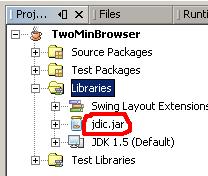
Click on the Projects tab in the IDE (Window->Projects), expand TwoMinBrowser. Now expand “Libraries” section, right click on it and select “Add JAR/Folder”. Navigate to the “jdic.jar” and add it. The projects tab should be like the image on the left.
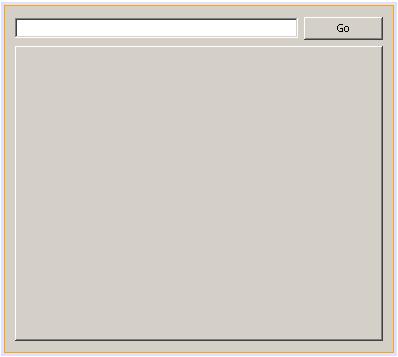
Expand “Source Packages”, right click on “twominbrowser” and select “New->JFrame Form”. Give it a name and click “Finish”. From the Palette, drag n drop a JPanel. Resize it to fit the full form. Now add a JTextField (txtUrl), a JButton and JTabbedPane (browPane). The final form should be like the screenshot on the right. Click on the image to see a bigger one.
Double click on the JButton (“Go”) or right click on it and select Events->Action->actionPerformed. Write the following code. Press Alt+Shift+F to resolve unresolved classes. Press F5. Should you get any errors, delete the Main.java from the “Source Packages” node and press F5 again. It should now compile and execute.
try
{
WebBrowser wb=new WebBrowser();
wb.setURL(new URL(txtUrl.getText()));
browPane.add(wb);
}
catch(Exception ex)
{
JOptionPane.showMessageDialog(null,ex.getMessage());
}
Type in a proper url at the textbox and click on “Go”. Our TwoMinBrowser will work. This is the result of display of yahoo page in our browser. The same code will work in linux also.
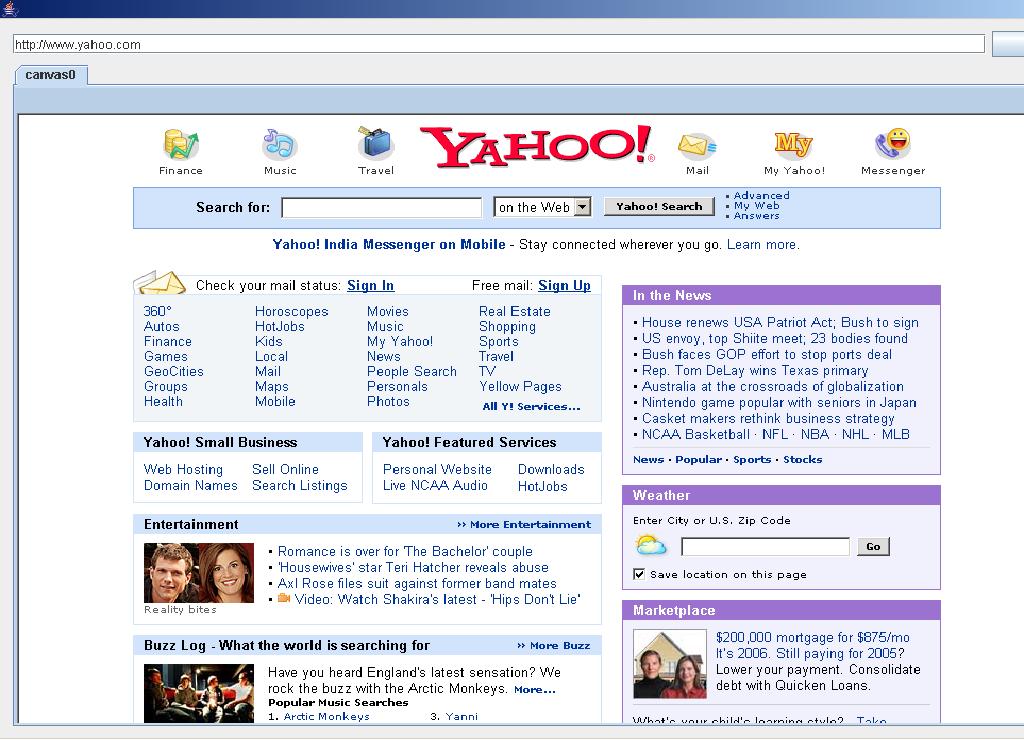
Change the url and click on “Go” again, you should see a new tab. Thats it, ur tabbed browser is up and running in just 3 lines of code. If you are a netbeans user already, building this will take you only 2 minutes.
As i’m writing this, Netbeans 5.5 preview release is installing. It requires JDK 1.5.0_06. In case you don’t have, download it here. Read about the UML features of Netbeans 5.5 here and here.
Bye!
Update: Geertjan has a cool post on porting this simple application to netbeans platform.
February 7th, 2009 at 10:56 am
Hi,
When i am trying to download this service its get error message..can u send me this jar file via mail..
March 20th, 2009 at 3:54 pm
Hi, when I push de bottom buttom i get a pop-pup message saying no “protocol:url”. Do you know what is the problem?
March 20th, 2009 at 3:57 pm
Sorry, I find de solution!! You have to write the complete URL with http. (i’m a fool)
The programa give me another error, don’t show me the web and give this message: “Can’t execute native browser. ErrMsg is null”.
Could you tell me what is the reason?
Thank you!!!
March 23rd, 2009 at 12:29 pm
Sialyn, this problem could occur when the OS’ browser object couldn’t be embedded in the app. In windows, internet explorer works perfectly & firefox creates some problems regarding the same.
March 23rd, 2009 at 2:27 pm
Thank you!!
I solved this problem when I downloaded it a more fresh jdic version.
Now I have another problem when I use this browser with google maps (my own google-map application) it throws a runtime exception “GMap2 is not defined”. I read it and it’s a java script problema, probably.
The ideas are wellcome!!
Thank you
July 7th, 2009 at 8:31 pm
i had tried your code every thing is working but web page is not displayed and follwing messages in run window are displayed
Exception in thread “AWT-EventQueue-0” java.lang.UnsatisfiedLinkError: no jdic in java.library.path
at java.lang.ClassLoader.loadLibrary(ClassLoader.java:1709)
at java.lang.Runtime.loadLibrary0(Runtime.java:823)
at java.lang.System.loadLibrary(System.java:1030)
at org.jdesktop.jdic.init.JdicManager$1.run(Unknown Source)
at java.security.AccessController.doPrivileged(Native Method)
at org.jdesktop.jdic.init.JdicManager.loadLibrary(Unknown Source)
at org.jdesktop.jdic.browser.WebBrowser.(Unknown Source)
July 9th, 2009 at 12:45 am
Wasif, compile the source code with the jdic library in class path. It should work then.
November 28th, 2009 at 4:17 pm
thanks its working.
is there any option to close a single page at a time.
March 6th, 2010 at 5:18 am
WoW! This is what I need!
This is great, I followed the steps, and I ended with one error.
The URL is underlined red, saying: cannot find symbol
symbol : class URL
location: class cleanwv.net
wb.setURL(new URL(jTextField1.getText()));
1 error
Can you help me out, since vrealy love the simplicity of application!
Beginner, Goran
June 17th, 2010 at 8:18 pm
I have very simple code :
CustomWebBrowser.java
import java.net.MalformedURLException;
import java.net.URL;
import org.jdesktop.jdic.browser.WebBrowser;
public class CustomWebBrowser {
public static void main(String[] args) throws MalformedURLException {
WebBrowser wb = new WebBrowser(new URL(“http://yahoo.com”));
}
}
I compiled it using :
javac -cp jdic-20060613-bin-cross-platform/jdic.jar CustomWebBrowser.java
It got compiled. But while running I am getting exception :
java -cp jdic-20060613-bin-cross-platform/jdic.jar:. CustomWebBrowser
Exception in thread “main” java.lang.UnsatisfiedLinkError: no jdic in java.library.path
at java.lang.ClassLoader.loadLibrary(ClassLoader.java:1812)
at java.lang.Runtime.loadLibrary0(Runtime.java:823)
at java.lang.System.loadLibrary(System.java:1045)
at org.jdesktop.jdic.browser.internal.WebBrowserUtil$1.run(Unknown Source)
at java.security.AccessController.doPrivileged(Native Method)
at org.jdesktop.jdic.browser.internal.WebBrowserUtil.loadLibrary(Unknown Source)
at org.jdesktop.jdic.browser.WebBrowser.(Unknown Source)
at CustomWebBrowser.main(CustomWebBrowser.java:8)
September 5th, 2011 at 1:06 pm
i am getting this error.please help me.
isDefaultBrowserMozilla
isDefaultBrowserMozilla
*** Jtrace: JDIC found BIN path=[D:\workspace\jdicTest\lib\windows\x86]
Can’t execute the native embedded browser. Error message: java.io.IOException: The filename, directory name, or volume label syntax is incorrect
*** Jtrace:
MyFocusListener: focusGained
September 5th, 2011 at 1:08 pm
i didn’t find any jdic distribution in the project site.can you please send it to my mail or please let me know if i can download from any other source.