Step by step instructions to install Ehndroix mod on Samsung Galaxy S Plus (GT-I9001)
October 14th, 2012
I recently installed the Ice-cream sandwich flavour of the Ehndroix mod. After hours of scouring the web & bricking my phone multiple times in the process, ICS is up and running on my phone. I’m documenting the exact process here so that it will be useful for everyone.
This post applies only for Samsung Galaxy S Plus GT-I9001. These steps might not work on any other phone. Even, if you are on I9001 phone, proceed at your own risk. No one (including me & God) is responsible if anything happens to you or your phone 😉
Assuming you are running the stock Gingerbread Android OS, here are the steps:
- Get all the required software
- Enable development mode on your phone
- Backup all your existing data
- Root your phone
- Install ClockworkMod Recovery 5.5.0.4
- Reboot your phone in recovery mode
- Install Ehndroix
- Install S3 style pack
- Reboot your phone
Buxfer – Automatic Data Backup
February 15th, 2011
A month ago, Buxfer.com went down & took down a month’s worth of data along with it. Thankfully I had a CSV export of my data before the website went down.
After that, I wrote a simple utility script that will automatically do a full CSV export of Buxfer accounts data and email it. At the start of the script, there are couple of PHP variables that you can use to customize it – your buxfer id and password, from email address, to email address, email content etc. To automate it completely, use crontab to schedule its execution and rest in peace 🙂 .
I have hosted the code at GitHub. Do check it out and let me know your feedback. Or better yet, fork it and add your bells and whistles.
Cameras must be WiFi enabled
April 30th, 2010
Few months ago, I purchased a Panasonic Lumix DMC FZ-28 digital camera. It’s a bridge camera and has plenty of features. I’m totally in love with the camera. However, cameras such as this, Canon Powershot SX 20 IS etc. should have a few more features along with wifi enabled so that we amateurs are able to do a lot more easily 🙂
Here’s a typical work flow for my trek photos:
Go on a trek –> Click nice pictures –> Transfer the photos to the computer –> Make minor modifications such as contrast, brightness, saturation, cropping etc. –> Remove duplicates –> Add signature, copyright notice –> Generate a low resolution version of the final photographs –> Upload them to Flickr/Picasa/Facebook to share them with the world.
With these powerful cameras, much of this can be done on the camera itself. For e.g. my camera already allows adding signatures to pictures through a text stamp feature. It also allows notes to be added to pictures. The pictures can be cropped and frame freezes can be obtained from HD videos shot with this camera. While cropping, a tiny popup containing contrast, saturation and brightness could be displayed. Pictures can be marked with a star so that they can be cycled through while viewing the clicks.

What I want now
Each camera should have a nice file system API, network API and GUI API. Using these APIs, third party applications would be able to fetch photos from the memory card and do the required modifications. More detailed descriptions would be added to the photos and they would be preserved as part of the picture’s EXIF data.
The memory card should be formatted in a special way so that it can hold third party applications in a separate shell. This shell would be accessible through an iTunes like desktop software from which third party applications for the camera can be installed or removed. Once an application is installed, it should be displayed in an Application settings screen on the camera, from where the application can be activated or deactivated.
Once the necessary modifications are done, using the network APIs and WiFi, the application should upload the “starred” photos to flickr, picasa, facebook or any other service the application supports. All these and other services support HTTP APIs. Instead of the camera themselves supporting various services, it could just provide nice APIs and let the developers do the magic. While uploading each picture, a very high resolution picture should be scaled down for the web dynamically.
Geo Tagging
Oh wait! I want to geo-tag the photos as well. So, while clicking each photo, they should be geo-tagged in the background so that the actual speed of clicking a photo isn’t affected. Manually geo-tagging photos are a huge pain in the wrong places.
So, there you go! Click pictures –> Geo tag them in background –> crop them & make other minor modifications –> add text stamp for copyright notice –> Generate low resolution versions dynamically (cache them if required) and upload them!
Since most of the work is done by software in digital cameras, I think the stuff mentioned above is very much feasible. At least geo-tagging should be brought in as a feature.
The Facebook Funnel called the ‘Like’ button
April 26th, 2010
Note: I haven’t yet published some trekking posts since Feb. But this couldn’t wait. So they’ll be up soon.
By now, everyone must have been aware of the recent Facebook announcement of the universal Like button. As probably talked about all over the web, this one button is like giving too much of power to one company. By now the Like button should have appeared on thousands of websites already. Famous press blogs running wordpress should have had the Like button along their standard ‘share this’ toolbar. Facebook’s 400 million+ user base is a huge audience to showcase your content to & everyone wants a piece of the pie!
However, this like button reopens an old problem in a new way… User Privacy. Few years ago, when doubleclick.net installed tracking cookies for sending customized advertisements, it created a huge uproar. Similar stuff happened when Google History came about. But now, Facebook uses a clever way to track users that, you cannot even opt out if you don’t like the process. It makes of full use of the way how the web and ultimately, HTTP(S) works.
I’m not even talking about the case where you are logged in to Facebook and click on a ‘Like’ button on a website. That’s voluntary. You like a piece of content and you spread it to your friends and fans on Facebook. I’m talking about the case where you just visit a certain website containing the Like button and that data will be harvested by Facebook.
Like this on Facebook to understand how it works: [sniplet fblike]
How it works
Let us take it step by step:
- Clear cookies on your browser. If you are using Firefox or Chrome, press Ctrl+Shift+Del.
- Visit www.facebook.com
- Login to Facebook.
- Visit other websites to be tracked. So simple isn’t it?
When you first visit Facebook.com, it sets a cookie called “datr”, whose expiry is two years from now. So, if you visit Facebook.com today and never clear your browser’s cookies, you will be tracked for the first two years with “datr”. When that period expires, it will be replaced with a new cookie 🙂 and you will continue to be tracked. After you login to Facebook, it sets some more cookies on your browser along with a cookie called “xs” which is the session cookie for your Facebook session. If you remove this cookie, you will be redirected to Facebook’s login page. After login, “datr” and “xs” cookies will be refreshed.

When you embed the Like button on your website, it loads in an iframe in the Facebook.com domain. When a request is sent to any website by clicking on a link or by typing it on the browser’s address bar, the browser sends all the active (non-expired) cookies to the domain. So, when the Like button loads on a website, it makes a request to http://www.facebook.com/plugins/like.php. Along with this request, it will send the “datr” and “xs” cookies. It will also set the HTTP ‘Referer’ header to the originating website. For example, if you click on a Facebook.com link from my website, the Referer header will be set as ‘www.aswinanand.com’. This is used by other websites to determine where the user is coming from.
Now, when the ‘Like’ button loads on a website inside Facebook’s iframe, the Referer header will be set to your website’s page, “datr” cookie will be sent and if you have already logged in to Facebook, “xs” cookie will also be sent. So, just by loading Facebook’s Like button, Facebook will know what websites you had visited. Since the expiry for “datr” is set to two years, it will associate your Facebook logins to this cookie… which means, even if you logout of Facebook, it will know who the user is. Moreover, when you are logged in and move from one place to another, Facebook will know during what times of the day you are active and during what times you are inactive. When you are active, it will know from where your web browsing occurs and by being able to find location from IP address, they will know where exactly you are moving. Don’t worry, all this data will also be combined with your Facebook mobile usage and a final stat will be arrived at! That’s scary because it could reveal so much about a user & all privacy is gone with the wind.
Targeted Advertisements
This kind of tracking is something the user cannot opt out because sending cookies and setting HTTP Referer headers are part of the protocol. That means, you are tracked by default. Without your knowledge, your online behaviour and all the websites you visit (assuming they have added the Like button) after logging into Facebook are tracked by Facebook. This is useful for a lot of cases. Say you visit IMDB after logging in to Facebook. Each of the movie pages will have the like button. So Facebook will know which movies you are visiting. When you click on the ‘Like’ button for a certain movie, it gets to know your tastes and offer more movies along similar lines when you visit IMDB next. This same technique could also be used by spammers to trick you in to ‘liking’ some random link of their choice.
Like this, through the iframe based ‘Like’ button, Facebook funnels all required data to create a customized and scary experience.
Why not Google?
Ideally speaking, this was something that Google should have done a year or two ago. Most people I know are logged in to Google all their day and web browsing happens simultaneously. Just think of what would would happen if Google had done this. With their already powerful search tracking user behaviour and statistics, adsense would use this data to send specific advertisements to users. Google analytics is already deployed on tons and tons of websites all over the web. This one ‘GLike’ button could also be used to track statistics so easily. Now all of that happens on Facebook. Facebook is luring developers and users alike with its huge user base 🙂 . Combining a utility like ‘Like’ button with Google’s powerful anti-spam, anti-phishing and other anti-* mechanisms, it would indeed become a formidable force on the web.
What if you don’t want to be tracked?
If you don’t want to be tracked without your explicit approval, I would suggest browsing Facebook in Incognito browsing mode in Chrome, multiple profiles in Firefox or InPrivate browsing mode in Internet Explorer. All these modes will clear cookies and other history data when you close the browser window. So you might not be tracked as efficiently as possible.
I hope Facebook addresses this privacy concern. Facebook, please don’t be evil 🙂 with our data. I wouldn’t be surprised if Facebook launches a general purpose search engine in the next couple of years!
Comparison: Skyfire and Opera Mini
October 26th, 2009
Ever since I discovered Opera Mini, I had installed it on my first mobile (K300i) and now the latest Opera Mini 5 beta is present on my Nokia E51. Few months ago a new browser came up for S60 3rd Edition Mobiles named Skyfire. The main selling point of this browser was almost full support for javascript and Adobe Flash with near desktop experience; which enabled us to watch YouTube videos on the mobile!
I had been using both browsers side by side for a few months now & came to feel that Opera Mini is a lot better for daily use and Skyfire is better for those one off toughie websites that must work with javascript and other stuff enabled.
Here’s an example: Recently, I started accessing my twitter account through Dabr from Opera Mini. The mobile UI rocks and zoom in and zoom out is instant. It happens in the client side. Opera Mini has an intelligent mix of client side and server side operations, whereas, all operations from Skyfire require an active internet connection. At best, internet access from mobiles through GPRS still remains patchy & hence, Skyfire should have that intelligent mix of operations and where possible, operations should be done at the client rather than server.
Opera desktop’s goodness of Speed Dial has arrived on Opera Mini 5. It’s awesome and saves you tons of clickety-clicks, which are irritating on a mobile. The whole menu system has been completely revamped. UI is smooth and fast (which is a downside with Skyfire)!
The best feature of Opera Mini of all is tabbed browsing. That blows away any other mobile browser on the planet. Being fast and loading heavy pages on separate tabs is a pretty awesome thing. By long pressing on a link, you can open them in new tabs inside Opera Mini. Hence, the Dabr + Opera Mini seems to beat any other twitter competition. Saved pages are really saved pages. They can be accessed even when there’s no connectivity.
Recently we had to book tickets to watch a movie at Mayajaal and Skyfire displayed the website amazingly well. Opera Mini suffered there. Similarly, Opera Mini rocks in opening popup windows (when clicked explicitly), whereas Skyfire fails. All in all, if you are going on a long journey with conservative power, Opera Mini is the way to go. Or if you want near desktop experience on your mobile for all websites, then Skyfire is the way to go.
Skyfire Gripes:
- No tabbed browsing.
- No landscape view of web pages and videos.
- Phone heats up after about 15 minutes of usage. Doesn’t ever happen with Opera Mini.
- Compared to Opera Mini, it is very heavy on battery.
- No option to logout from your Skyfire account. You have to manually delete the “Preferences” file to logout.
- The assumption that an active internet connection is always available.
- Proxy server support and proxy authentication i.e. HTTP code 407. I have been asking this for so long that I’m beginning to feel that this feature won’t come at all.
Opera Mini Gripes:
- No flash support.
- Javascript should be supported better.
- Zoom in to images is dismal. I hope this issue will be corrected when Opera Mini 5 comes out beta.
- This browser also doesn’t have support for proxy servers and proxy authentication.
What are your opinions on these two browsers? What browser are you using on your mobile phone?
Skyfire Review
June 1st, 2009
Skyfire 1.0 is the new kid on the block in the mobile browser war. Its not a kid per se but there are some big boys like Opera Mini and Opera Mobile who don’t give up all too easily. I have been a beta user of it from India since 0.6 😉 and it was fun all this while to keep track of this superb browser. Their main aim is to bring desktop like browsing experience to the mobile browser and they are almost there. So near, yet so far.
Like all other reviews about this browser until now, its safe to tell that it is able to play flash videos pretty well inside the small screen. Here are some notable differences between the earlier betas and this 1.0 version:
- While watching any videos on youtube, my Nokia E51‘s rear would just heat up quickly & few minutes down, it would be difficult to hold the phone. This problem has been nearly solved in 1.0. That’s possibly due to power optimization techniques.
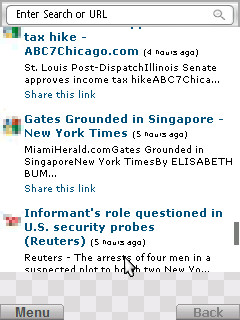
- When you scroll very quickly on long web pages, Skyfire usually shows a checkered screen with gray squares (screenshot below), which disappear as and when content appears. Pre 1.0, this checkered screen would take a long time to disappear. With 1.0, this problem has been solved. Same problem used to occur during zoom in/out. Now zoom happens at blazing speed. Neat!
- Its able to handle basic javascript very well. For e.g. its able to display the hover menus that are present on top of my blog. Its also able to show alert boxes.
- Video quality is maintained even during zoom in and zoom out. This was a major drawback in pre 1.0 versions.
- The initial loading and shutdown of the browser would take a long time in pre 1.0 releases. Not so in this current release. This has been drastically improved.
- File downloads happens excellently. Kudos for this. This is a major drawback with the E51’s native browser.
Bulk Assign Categories to Multiple Posts
October 14th, 2008
Here’s a cool new wordpress plugin that allows you to assign one or more categories to multiple posts in a single shot, with or without preserving existing categories.
This plugin will be very useful when you are migrating to your own wordpress blog, hosted on your domain. The default wordpress functionality is that, you can assign new categories to posts only by editing each post and changing the category assigned to it. So, if you have a large number of posts, then it will be a nightmare.
Enter this plugin.
With this plugin, assigning multiple categories to one or more posts is a breeze. Pop the plugin’s PHP file to your wordpress plugin directory, activate it and click on “Assign Categories” under the Manage menu. The page will show the list of available categories, followed by the available blog posts. You can select the categories, select the required posts and then click on “Assign Categories” at the bottom of the page. Now, all your posts will be assigned the new categories.
The plugin is licensed under GPL v2 (the same as wordpress).
Download the plugin, take it for a test drive and let me know.
Dissecting iMobile – Security Analysis of ICICI Mobile Banking App
September 27th, 2008
ICICI Bank’s iMobile website has some of the worst server side validations ever, which is what prompted me to download the mobile app’s JAR file, study it in detail and write this post. According to the website, until the Reserve Bank of India comes out with mobile banking guidelines and approves it, mobile banking is supposed to be halted. Technically, it means that, all existing users shouldn’t be able to use the service what-so-ever and new user signups should be prevented & a notification stating that they should retry later should be shown.
Therefore, in this scenario, I shouldn’t have been able to download the app to my mobile device. The website of ICICI fails in not enforcing this by providing the following ways:
- Existing users who have already installed the app are given an option to ‘Upgrade’ from within the mobile app itself. This opens up a webpage in the phone’s native browser, whose URL is http://mobile.icicibank.com/upgrade?version=null.
- The actual iMobile website has some stupid javascript validation, which is very easy to bypass using modern browsers. Heck, just by browsing the HTML source code of the page, you will be able to easily find the URL for the application JAR files. Put 2 and 2 together and you will be able to download the app.
Which brings me to explain Step 2 in detail:
document.jump1.action="https://infinity.icicibank.co.in/web/apps/"+fileName;. That line pretty much gives away everything. All you have to do is, navigate to the above mentioned URL and append a filename to it for download.What filename do you have to give and How?
Where ICICI Bank failed?
- They should have disabled the link mentioned in #1 above and replaced it with some text that says, “RBI mobile banking guidelines blah blah…”. But some clever users will bookmark the link to the JAR file and try to access the JAR file by bypassing the link itself. When they do that, the web server should return a “404 – Resource Not Found” error. Got it? Implementing this is pretty simple.
- There shouldn’t have been such a lot of useless javascript on the page. Firstly, they should have removed the device selection drop down box. Secondly, they should have replaced this page with an alternative. Thirdly, this mobile banking link should have been removed in the home page itself. Fourthly, they should have validated on the server for JAR file downloads and should have displayed the “404 – Resource Not Found” error page.
- Ok. Leave aside #1 and #2. At least the mobile app should have thrown soft errors when users try to access mobile banking from the JavaME app. Any bank would store all activity data for a certain period of time. So when you access the bank’s service from a mobile device, the server software surely knows about it, which means, the server software should have returned errors to the user instead of allowing the user to do transactions.
- There’s one more bug in the app itself. When you launch the app, it will prompt you to sync the data on the device to its servers for faster access the next time. When you click “OK” to synchronize, it will wait for a few minutes and show a message as, “There is no data to synchronize”. When you proceed further and try to access your info, it will again prompt you to sync the data. That’s frustrating. Either you should sync the data properly or you should access the server every time over a secure channel. As simple as that. That’s not followed too.
That was a long post already 🙂 We still have some more to go. Lets take a break.

Back? Ok 😀 Now, lets dissect the actual JAR file and look into the technical details of its implementation.
The Manifest File:
Another important item is, “MIDlet-Name” property in the manifest. This property determines what name the user sees after he installs the app on his mobile. Using the same name, when future upgrades are made available, the app is just replaced in place of the old one, which means, if you modify the “MIDlet-Name” property and install the app again, you will have 2 copies of the same app. THIS SHOULD NEVER BE ALLOWED FOR A HIGHLY CRITICAL FINANCIAL APPLICATION. Isn’t it? As an example, try changing the MIDlet-Name of the Yahoo! Go JAR file and try to install the app again on your mobile. My E51 shows an “Invalid JAR” error message because of MD5 sum checks etc.
Some more Holes:
What should the bank do here?
- Shouldn’t allow the installation of 2 apps of the same JAR with different names. Take this example of the Yahoo! Go JAR file.
- I guess these mobile providers’ socket URLs are used for a one time basis to send verification SMS. If that be the case, they shouldn’t be present in the manifest file for a variety of reasons that I won’t discuss here.
- There’s an interesting property named “WSCDomainName” in the manifest file. I guess it expands to “Web Service Client Domain Name”, though I’m not sure about it. Suggestion: Encrypt the name value pairs.
- Most importantly, sign the application using the Java Signed program. C’mon, users are doing financial transactions and a signed app will increase their confidence of using this application.
Suggestion for Users:
Thats about it !
Of course, this blog post can’t be termed as a full fledged security analysis. But most of what has been ignored by the bank are mere basics. They must have more secure systems in place.
If you liked this article, kindly do me a favour by digging it. Thanks for your time.
RSS Feed Proxy – Finally one data format to parse all feeds
July 12th, 2008
Hey guys! I discovered two feed proxies.
- http://www.netvibes.com/proxy/feedProxy.php?test=1&url=__FEED_URL__
- http://my.live.com/cfw/news.aspx?fetchurl=__FEED_URL__
Replace the __FEED_URL__ with the feed URL of your choice. Of the two feed proxies above, I like Netvibe’s proxy as the best because of the following reasons:
- Feed output is JSON. This means that, netvibes has done all the necessary work to convert feeds of any type (RSS, ATOM, RDF etc.) into JSON.
- If you are writing a script to examine feeds from various sites, you have only one data structure to deal with 😉
- Almost all programming languages support JSON. Refer to www.json.org for JSON libraries available for various programming languages.
- JSON by itself is very lightweight and eliminates most of the overhead of XML, thereby preserving bandwidth.
- A simple program in VB.NET to parse a JSON structure and get the required feed data in a Dictionary datatype is only about 9 lines of code. In Ruby, it will be even lesser. Compare the same with XML output. Even though feed parsers are available, you have to create your own wrapper above everything to get everything to work out properly. Reuse what you already have (DRY Principle). Netvibes has already done the bull work to convert all kinds of feeds into a common format.
- Best of all, no authentication is necessary to access these links 😀
Live.com’s feed proxy returns the actual feed output. So, if the feed you are referring to gives RSS output, this proxy returns that. The same happens with ATOM, RDF etc. Keep watching this space. I will update the post with other feed proxy URLs that I encounter. If you go across any, please mention them in the comments section.
Â
NTFS, Gmail Keyboard Shortcuts
April 18th, 2008
Two things today:
Few days ago, I was searching for information on NTFS and found 2 amazing articles from the good old MSJ (Microsoft Systems Journal). The links are below. Do go through them when you find time. Even though the articles are old, they offer a wealth of information.
- Windows NT 5.0 File System – http://www.microsoft.com/msj/1198/ntfs/ntfs.aspx
- NTFS Change Journal – http://www.microsoft.com/msj/0999/journal/journal.aspx
There are lot more articles available. I will post the links as and when I read them. Nice stuff !
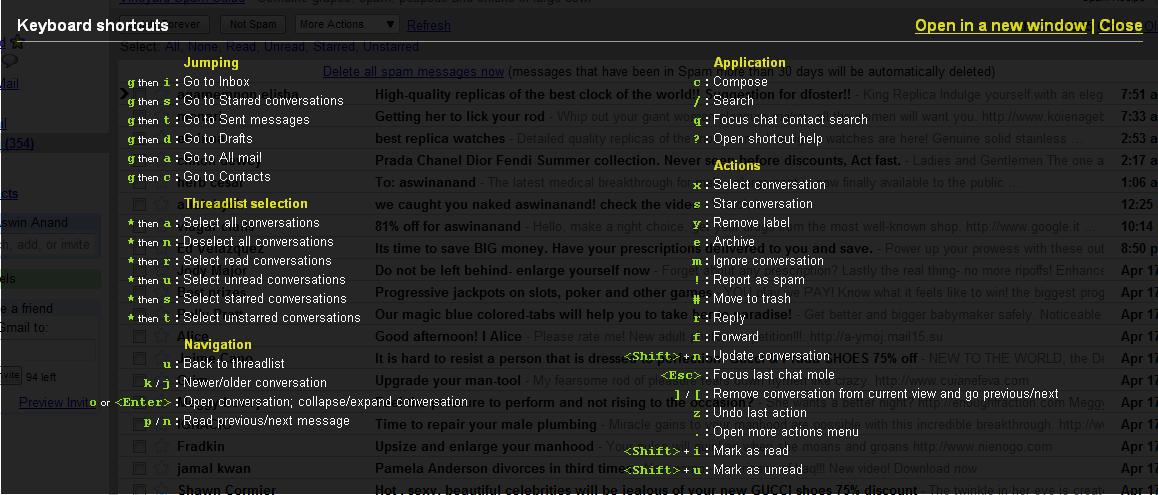
As you already know, I have enabled keyboard shortcuts on my gmail account. Gmail actually shows you the list of available shortcuts right inside your mailbox, without us having to visit the keyboard shortcuts page. To access the list of keyboard shortcuts, you need to press “?” key, which is “Shift + /“. You will get the translucent black popup as shown in the below screenshot. You can press any key to close it.
Click the image to see a larger version.